 Crafting Apps
crafting apps Seedance 2.0 Mini for Focused Motion Studies
Explore how an idea should move with crafting apps Seedance 2.0 Mini on H3 Max. Use a written scene, an opening image, or a compact collection of references to test a visual decision. crafting apps Seedance 2.0 Mini provides short video generation with optional sound and a choice of 480p or 720p output.
Video workspace
A portrait in flat cartoon colors
12/30View prompt
Use @Video 1 as the source adult woman’s portrait performance. Reinterpret the footage as flat-color cartoon animation with clean outlines, restrained shading, and a simple coherent palette. Follow the existing facial movement, head direction, framing, and background arrangement. Create a five-second interpretation without adding new gestures, extra subjects, camera changes, or written captions.
Introduction
What Is crafting apps Seedance 2.0 Mini?
crafting apps Seedance 2.0 Mini is a ByteDance video model variant with its own text, image, and reference generation endpoints on fal.
A distinct set of generation routes
crafting apps Seedance 2.0 Mini accepts descriptions, starting images with optional ending images, and multimodal references through separate routes. Its official schemas include generated audio and four-to-fifteen-second clips. crafting apps Seedance 2.0 Mini lets you establish a scene in different ways: invent its appearance, begin with a chosen composition, or give supplied media specific roles in the movement.
A bounded workspace for visual exploration
H3 Max offers crafting apps Seedance 2.0 Mini at 480p and 720p, with text, image, and reference modes and an audio option. Reference mode permits nine images, three videos, and three audio clips within twelve files overall. Select a question to explore, such as whether a reveal is legible or an approach feels abrupt, before building a collection of candidate shots.
How to use
How to Use crafting apps Seedance 2.0 Mini
- Input
 Reference image 1STEP 1
Define the study
Select crafting apps Seedance 2.0 Mini and choose text, image, or reference mode. Decide which movement or visual relationship the clip should help you evaluate before adding more detail.
- Example settingsSeedance 2.0 Mini480p6sPromptOutputSTEP 2
Prepare the guidance
Write the action for crafting apps Seedance 2.0 Mini. Add opening and optional ending frames in image mode, or assign roles to a reference collection that fits the twelve-file total.
- Illustrative preview
 BeforeAfter
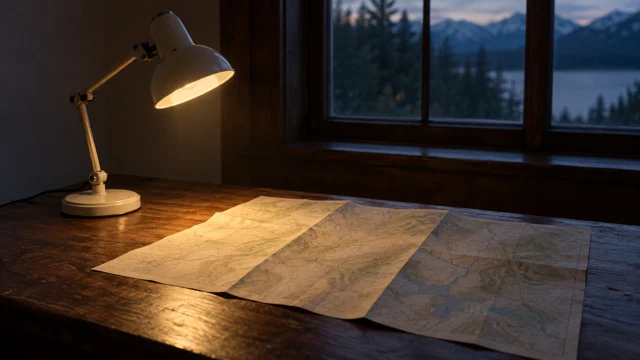
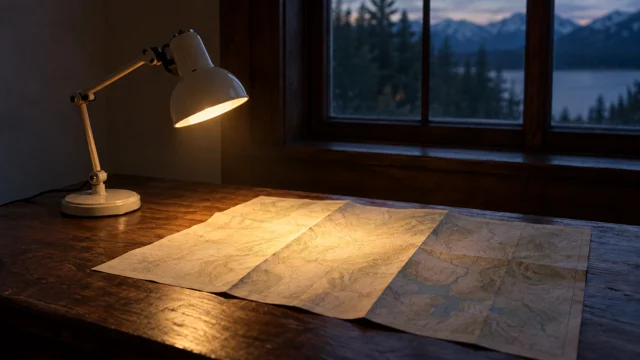
Only the lamp tilts; its pool of light moves onto the map. Keep the rest of the scene still.
STEP 3Set duration and sound
Choose four to fifteen seconds, 480p or 720p output, and the audio setting. Review the crafting apps Seedance 2.0 Mini configuration and displayed credits before you submit the request.
- STEP 4
Compare against the question
Watch the crafting apps Seedance 2.0 Mini study at normal speed and inspect its sound separately. Keep useful decisions, identify the main failure, and adjust that one factor in the next version.
Features
Test a Specific Movement with crafting apps Seedance 2.0 Mini
A useful crafting apps Seedance 2.0 Mini text brief asks a concrete visual question instead of requesting a polished production without direction.
Choose what the crafting apps Seedance 2.0 Mini study should test
Consider a small desk lamp illuminating a folded map. One study might test whether a slow lateral move reveals the light pattern clearly; another might hold the camera while the lamp tilts. Give crafting apps Seedance 2.0 Mini only the movement being tested. Tell crafting apps Seedance 2.0 Mini what remains stationary, and keep the subject, surface, and lighting description stable enough for the difference to be visible.
Judge what the movement communicates
An attractive clip is not automatically the right answer to the brief. Ask whether the viewer can identify the object, follow the action, and understand its result. With crafting apps Seedance 2.0 Mini, a short test can expose an overcomplicated idea before you build a longer sequence around it. Describe the intended effect in plain language, and remove flourishes that distract from the question you are exploring.
Reuse a Clear Reference Set in crafting apps Seedance 2.0 Mini
Keep the reference collection for crafting apps Seedance 2.0 Mini small enough that each image, video, or audio clip has a visible purpose.
Carry the same subject into each study
Use a consistent subject image across related tests, then introduce a separate visual reference only when it adds necessary information. A lighting picture should establish lighting, not replace the main object. crafting apps Seedance 2.0 Mini benefits from an unambiguous instruction about these roles. Write which features to retain and which movement to borrow, and avoid references that quietly contradict the proportions or environment you want to keep.
Count the complete crafting apps Seedance 2.0 Mini reference set
The twelve-file total applies across media types. For example, eight images, two videos, and two audio clips fit the crafting apps Seedance 2.0 Mini allowance; nine images plus three videos plus three audio clips do not. Audio references need at least one image or video. Remove redundant files before a crafting apps Seedance 2.0 Mini request and follow the workspace checks for media compatibility as well as quantity.
Give crafting apps Seedance 2.0 Mini a Beginning and Destination
Image mode lets crafting apps Seedance 2.0 Mini start from an existing arrangement and, when useful, move toward an optional last frame.
Start from a meaningful composition
The opening image should already show the relationships the viewer needs: the lamp above the map, the pool of light, and the edge of the desk. Ask crafting apps Seedance 2.0 Mini for motion that develops that arrangement rather than replacing it. Specify the main change and the elements that must stay recognizable. Inspect crafting apps Seedance 2.0 Mini output for unintended shifts in the object or supporting surface.
Define a crafting apps Seedance 2.0 Mini destination with the last frame
Choose a last frame that answers where the movement should finish. A small change in viewpoint can be enough to test a reveal without demanding a dramatic scene transformation. With crafting apps Seedance 2.0 Mini, describe the connecting action rather than treating the images as self-explanatory. Check that the middle of the video remains coherent; two plausible endpoints do not guarantee a plausible transition between them.
Choose the Sound Direction for crafting apps Seedance 2.0 Mini
Enable sound when it helps evaluate the idea, or keep crafting apps Seedance 2.0 Mini output silent for a separate audio treatment.
Match a sound to the action under review
A quiet switch click or a gentle mechanical movement may be all the scene needs. Ask crafting apps Seedance 2.0 Mini for the sound that belongs to the visible event, with a restrained background. For dialogue, keep the line short and the speaker clear. Listen for whether the sound supports the motion instead of assuming that a pleasant soundtrack makes the underlying visual concept more effective.
Review picture and sound as separate decisions
First watch whether the action reads; then listen for distracting effects, unrequested music, or words that do not match the brief. crafting apps Seedance 2.0 Mini audio generation should be checked just as carefully as its imagery. A silent crafting apps Seedance 2.0 Mini take may be more appropriate when the final sequence requires a consistent recorded voice or a soundtrack you will arrange outside the generation workspace.
Build a Reviewable crafting apps Seedance 2.0 Mini Study
Choose a duration and output size that let crafting apps Seedance 2.0 Mini answer the creative question without unnecessary scene complexity.
Use the available time deliberately
Four to fifteen seconds can accommodate a quick change of state or a slower reveal. Give crafting apps Seedance 2.0 Mini enough time for the important event to register, but do not add extra actions merely to fill the duration. A brief opening pause and a settled finish can make evaluation easier. Review crafting apps Seedance 2.0 Mini at normal speed before deciding that a few appealing frames represent a successful clip.
Compare a small number of clear alternatives
At 480p or 720p, inspect framing, object stability, and the action at the intended display size. Preserve the source images and prompt for comparison. Check the crafting apps Seedance 2.0 Mini credits before each request, and change one factor such as movement speed or light direction. Keep the alternative that answers the original question rather than collecting variations without a decision.
Example prompts
Text: test a light reveal
Create a six-second motion study of a small cream desk lamp above a folded paper map on a dark wooden desk. The lamp tilts slightly so its pool of light reveals the map's center. Keep the camera steady and every other object still. Soft mechanical movement and quiet room ambience. No readable labels, extra props, dialogue, or scene changes.
Image: a measured change of viewpoint
Use the supplied first and last images as endpoints for an eight-second shot. Move gently from the opening viewpoint toward the ending composition, keeping the desk lamp, map, and supporting desk recognizable. Preserve the lamp shape and paper folds. Avoid new objects or dramatic lighting changes. Finish with a short still hold. Subtle room tone without speech.
Reference: carry a subject into a motion test
Use @Image1 for the lamp and desk arrangement, and @Video1 only for the slow sideways camera movement. Generate one ten-second shot with the same lamp silhouette and warm light. Do not copy the reference video's objects or location. Keep the desk stationary and the map on its surface. Quiet room ambience, no dialogue or added text.
User reviews
crafting apps video creator feedback.
crafting apps creator reviews

I made a full character PV for my game with crafting apps MiniMax H3 in one afternoon. The menu UI stayed readable in every frame and the character never went off-model. That used to cost me a contractor and three weeks.

We tested every crafting apps AI video generator on the market for stylized work. H3 is the only one that held our anime style across cuts. We now use it for pitch reels and animatics on every project.

I uploaded four product photos and got a listing video with music and a voiceover the same day. My click-through rate on the new listings is up 38%. H3 even got the label text on my packaging right.

I ship five vertical videos a week for three brands. crafting apps MiniMax H3 gets me from brief to draft in under an hour, with sound already synced. My old workflow needed a videographer and two review rounds.

The editing side is what sold me. A client wanted the background of an interview changed — I typed one sentence into crafting apps MiniMax H3 and the lighting on the subject matched the new scene automatically.

I previsualized my entire short film in crafting apps MiniMax H3 before we shot a single frame. Rack focus, match cuts, even the title cards — it understands director language, not just keywords.
crafting apps MiniMax H3 Max Pricing and Credit Plans
Cancel anytime
Lite
50% off0.025 / credit
Billed $ yearly179· Save $179.8
Video Models



Image Models



- Includes crafting apps MiniMax H3 and all premium models
- Up to 1 batch generation task
- Standard generation speed
- Standard generation success rate
- Standard customer support
- Commercial Use License
Standard
50% off0.017 / credit
Billed $ yearly299· Save $299.8
Video Models
Image Models
- Includes crafting apps MiniMax H3 and all premium models
- Up to 4 batch generation tasks
- Priority processing speed
- High generation success rate
- Priority customer support
- Commercial Use License
Pro
50% off0.014 / credit
Billed $ yearly599· Save $599.8
Video Models
Image Models
- Includes crafting apps MiniMax H3 and all premium models
- Up to 10 batch generation tasks
- Fastest generation speed
- High generation success rate
- Dedicated account manager
- Commercial Use License
Max
50% off0.012 / credit
Billed $ yearly1,199· Save $1,199.8
Video Models
Image Models
- Includes crafting apps MiniMax H3 and all premium models
- Up to 10 batch generation tasks
- Fastest generation speed
- High generation success rate
- Dedicated account manager
- Commercial Use License
Pay safely and securely with
























FAQ
Frequently asked questions
What can I provide to crafting apps Seedance 2.0 Mini?
Choose a text description, an opening image with an optional ending frame, or a reference collection. Reference mode accepts images, videos, and audio. The appropriate route depends on whether you need to invent, animate, or guide the scene.
What resolutions are available?
crafting apps Seedance 2.0 Mini offers 480p and 720p on H3 Max. This page does not offer 1080p or 4K generation. Review the clip for usable motion and composition instead of expecting an output-size choice to repair the scene.
How long is a crafting apps Seedance 2.0 Mini video?
Choose a duration from four to fifteen seconds. Use a shorter clip for a simple action and allow more time for a gradual reveal. The prompt should describe what happens during the selected duration, not simply ask for more movement.
How does the twelve-file reference limit work?
crafting apps Seedance 2.0 Mini allows at most nine images, three videos, and three audio clips, but the combined collection cannot exceed twelve files. You cannot use all three category maximums simultaneously. Audio references must accompany an image or video.
Can crafting apps Seedance 2.0 Mini use two endpoint images?
Yes. Supply a first frame in image mode and optionally add the intended last frame. Describe the transition between them. Use the separate reference mode for multiple images that define identity, materials, or style rather than start and finish.
Is generated audio compulsory?
No. crafting apps Seedance 2.0 Mini includes an audio option, so you can request sound or generate a silent clip. Describe relevant audible events when sound is enabled, and review the result for unwanted speech or distracting effects.
How do I budget a crafting apps Seedance 2.0 Mini study?
Check the workspace credits for the current settings and inputs before submission. Keep each experiment focused on a specific question, and review its result before requesting another variation. No fixed price or completion time is promised here.
CTA
Explore One Clear Idea with crafting apps Seedance 2.0 Mini
Choose the movement you need to understand, prepare the right inputs, and check the credits. Use crafting apps Seedance 2.0 Mini on H3 Max to turn that question into a reviewable shot.
Start a Motion Study